# Major Recall Alert: Dexcom G7 iOS CGM App Recalled Due to Display Flickering Sequentially Through Previous Estimated Glucose Values (EGVs)
A major recall has been announced for the **Dexcom G7 iOS CGM App** in Canada. The issue? The app's screen flickers sequentially through past **Estimated Glucose Values (EGVs)** before showing the current data. This malfunction could potentially cause confusion or delays in managing glucose levels for users who rely on this continuous glucose monitoring (CGM) system. Here's what you need to know and how you can take action to stay safe.
## Why This Recall is Important
Dexcom’s G7 iOS CGM App is widely used by individuals managing diabetes. It provides real-time glucose readings to help users make critical decisions about food, insulin, and exercise.
However, the **flickering display issue** identified in the **Dexcom G7 iOS app** can lead to significant challenges:
- **Delayed Insight:** Users must wait for the app to cycle through past readings before seeing their current glucose value, causing inconvenience.
- **Potential Risks:** For individuals relying on immediate readings, delayed data can lead to unnecessary stress or mismanagement of insulin or dietary decisions.
According to health authorities, resolving the issue promptly is crucial to ensure the product works as designed and does not compromise user safety.
## Details of the Recall
The details of the recall are as follows:
- **Category**: CAN – Software/Application Issue
- **Product Name**: Dexcom G7 iOS CGM App
- **Brand**: Dexcom G7
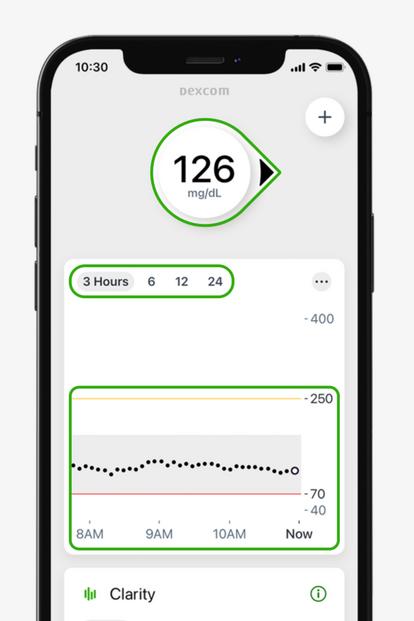
- **Recall Reason**: The iOS app’s display flickers and sequentially shows previous **Estimated Glucose Values (EGVs)** before finally displaying the current data.
- **Date Announced**: [Insert Date].
- **Image**:
For an official source and more information, please visit the Canadian recall alert page here: [Dexcom G7 iOS CGM App Recall Notice](https://recalls-rappels.canada.ca/en/alert-recall/dexcom-g7-ios-cgm-app).
## What You Should Do
If you are a user of the Dexcom G7 iOS CGM App, here are the steps you should take immediately:
- **Check for App Updates**: Ensure you are using the latest version of the app, as Dexcom may release patches to fix the display issue.
- **Monitor Device Closely**: Be vigilant when reading your glucose values to ensure you are accessing the current EGV.
- **Contact Dexcom Support**: Contact Dexcom's customer support team to report issues or inquire about further instructions.
- **Consult with Your Healthcare Provider**: If you experience uncertainty with your glucose monitoring due to this app issue, consult your healthcare provider for guidance on alternative glucose monitoring strategies.
## Stay Safe – Get Instant Recall Alerts
Recalls like this underline the importance of staying informed about the products we rely on every day. By subscribing to recall alerts, you can ensure you are notified of critical updates as soon as they happen.
👉 **Tip**: Already using the Dexcom G7 iOS CGM App? Be sure to download any necessary updates directly from the Apple App Store to fix any bugs and enhancements that may address this issue.
For more details on this recall and steps you can take, visit:
**[Dexcom G7 iOS CGM App Recall Notice](https://recalls-rappels.canada.ca/en/alert-recall/dexcom-g7-ios-cgm-app).**
By staying proactive, you can remain safe and informed. Together, let’s prioritize health and safety!